Localization Vendors
Operating guidelines for localization vendors working in Pixwel — turnaround expectations, asset handling, and changing work request status correctly.
Operating guidelines for localization vendors working in Pixwel — turnaround expectations, asset handling, and changing work request status correctly.
This guide is for localization vendors — the partners who produce localized assets and move orders through to delivery.
The Pixwel Platform team operates Monday–Friday, 24/5, with no weekend coverage unless pre-approved. Work requests submitted over the weekend are processed first thing Monday morning.
| Item | Typical time |
|---|---|
| OV content posting | 2–3 hours |
| OV scripts | 4–6 hours |
| Localized file processing | 60–90+ minutes |
| Drop-dead ingest for launches | 6 business hours before embargo lift |
AE COLLECT folder without renaming or reorganizing.Recommended notifications to enable: New/Updated Assets, Order Status, Order Discussion Comments, and Order Preview Comments.
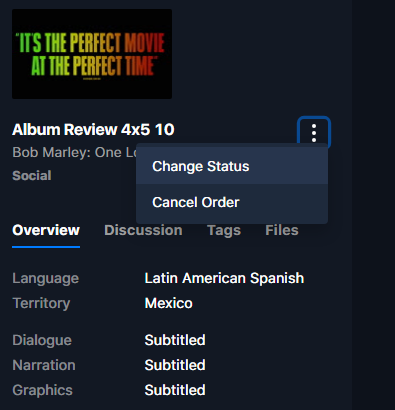
Within a work request, click the vertical ellipsis (⋮) beneath the asset thumbnail.
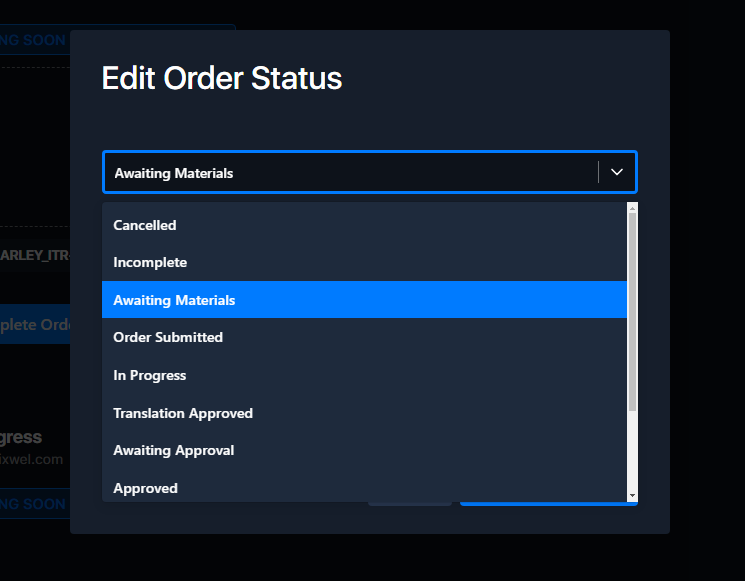
Select the new status and click Save Status Change.
Enter the reason for the change and click Confirm.
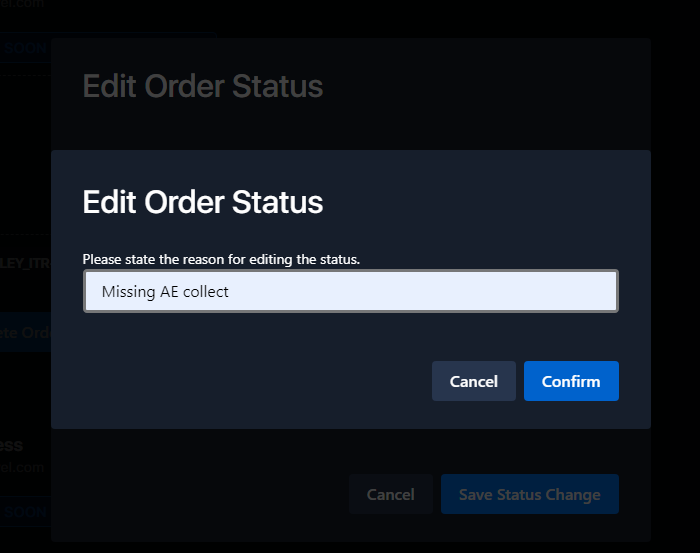
The reason is visible to Head Office in reports, so make it accurate. Keep status progression linear wherever possible — change status forward or backward only when genuinely necessary.