Subtitler
Pixwel's built-in editor for translating, timing, and positioning subtitles — with translation memories, machine translation, and line-by-line source tracking.
Pixwel's built-in editor for translating, timing, and positioning subtitles — with translation memories, machine translation, and line-by-line source tracking.
The Subtitler is where subtitled localizations are produced — a full editor that runs right in Pixwel, so there’s no separate tool to install or files to shuttle around. You translate line by line against the original, time and position each subtitle on the frame, and submit when it’s ready.
The Subtitler opens when you work a Subtitled order — for example by choosing to translate now after placing it, or from the order itself. The screen is split into three parts:
Click a line to edit it. Each line shows the original (OV) text for reference and a field for your translation.
Two toggles fill lines in for you so you start from a draft instead of a blank grid:
These layer in a clear order of precedence: your edits win, then Memories, then Machine, then the original. Turning on Machine never overwrites a line you’ve already translated by hand.
Some lines may stay in the original language if nothing filled them. On submit, Pixwel flags any lines left untranslated so you can confirm that was intentional.
Because lines can come from several places, the Subtitler color-codes each line by where its text came from — a left-edge stripe, with a key at the top of the editor. At a glance you can see what was reused, what was machine-drafted, and what you wrote.
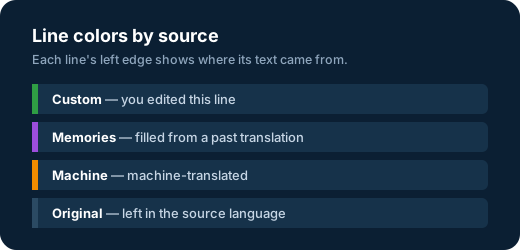
The colors are deliberately chosen to stay distinct for colorblind and grayscale viewing.
From a line’s menu you can reshape the subtitles:
Turn on Translation Memories or Machine Translations before you split or merge — those auto-fills are re-aligned to the new line layout when the structure changes.
You can import an existing subtitle file when it matches the line count, and export your work to use elsewhere:
.srt, .sub, or .ass.srt or .ass| Format | What it is | Best for |
|---|---|---|
SRT (.srt) | SubRip — timed lines of plain text, with no styling or positioning. The most widely supported subtitle format. | Interchange and quick hand-offs. |
ASS (.ass) | Advanced SubStation Alpha — carries fonts, styling, and exact on-screen positioning, so subtitles look and sit exactly as set. Pixwel exports ASS using the language’s translation font (with a tuned variant for vertical/TikTok). | Finished, styled subtitle deliverables. |
SUB (.sub) | An older subtitle format. | Importing legacy files. |
An imported file has to match the current line count so it lines up with the existing timing and structure.
A progress counter tracks how many lines are done. When you submit, Pixwel renders the result so it can be reviewed as an offline and approved.
When an order uses a third-party translator with approval required, the roles split cleanly:
For eligible assets, automated localization opens the Subtitler pre-filled so you only review and adjust before submitting — final subtitled files come back in minutes, labeled AUTOSUB.
For a step-by-step walkthrough of ordering and subtitling, see the Subtitling & translation guide.